


Talk to the experts
Learn more about Extend and find out if it's the right solution for your business.
March 25, 2026 2:20 PM
Teams using Extend can now move faster from transaction to reconciliation with new updates that simplify expense workflows and deepen accounting connections.
With these updates, you can:
As organizations grow, expense workflows become more complex. Transactions happen across multiple cards, projects, and departments, while finance teams still need clear visibility into spending and reliable data for reconciliation.
Extend strengthens the connection between card spend and accounting workflows—helping teams capture the right expense information earlier, and prepare transactions for reconciliation before they reach the general ledger.
Recent updates expand accounting integrations and improve how teams organize and review transactions inside Extend, helping finance teams move faster through everyday expense management workflows.
Here’s what’s new.
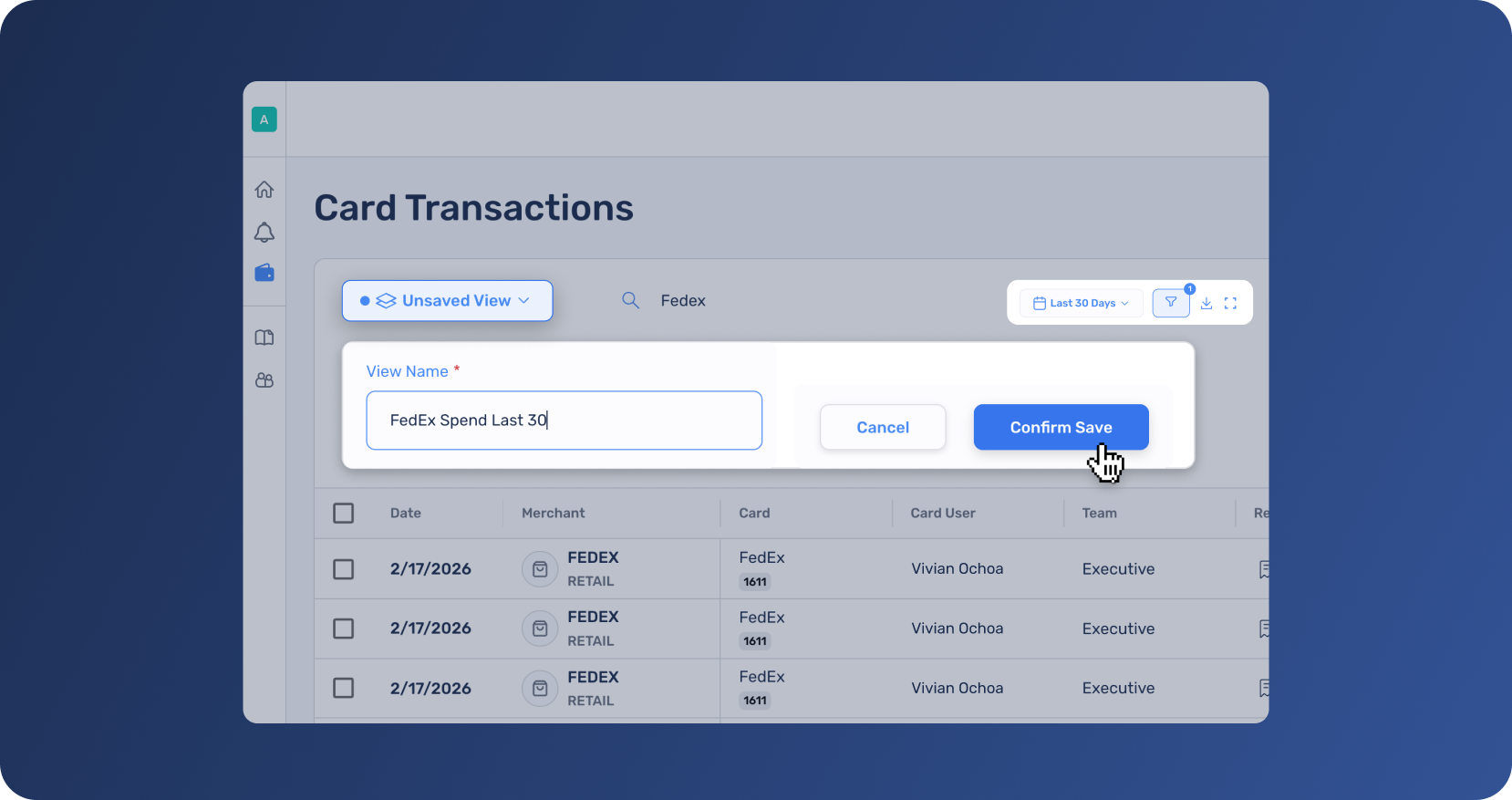
Finance teams repeatedly return to the same transaction workflows every day—review transactions missing receipts, prepare expenses for reconciliation, or analyze spend by vendor, department, or cardholder.
Saved Views allow users to save the transaction page with their specific workflow filters and columns so teams can return to them instantly.
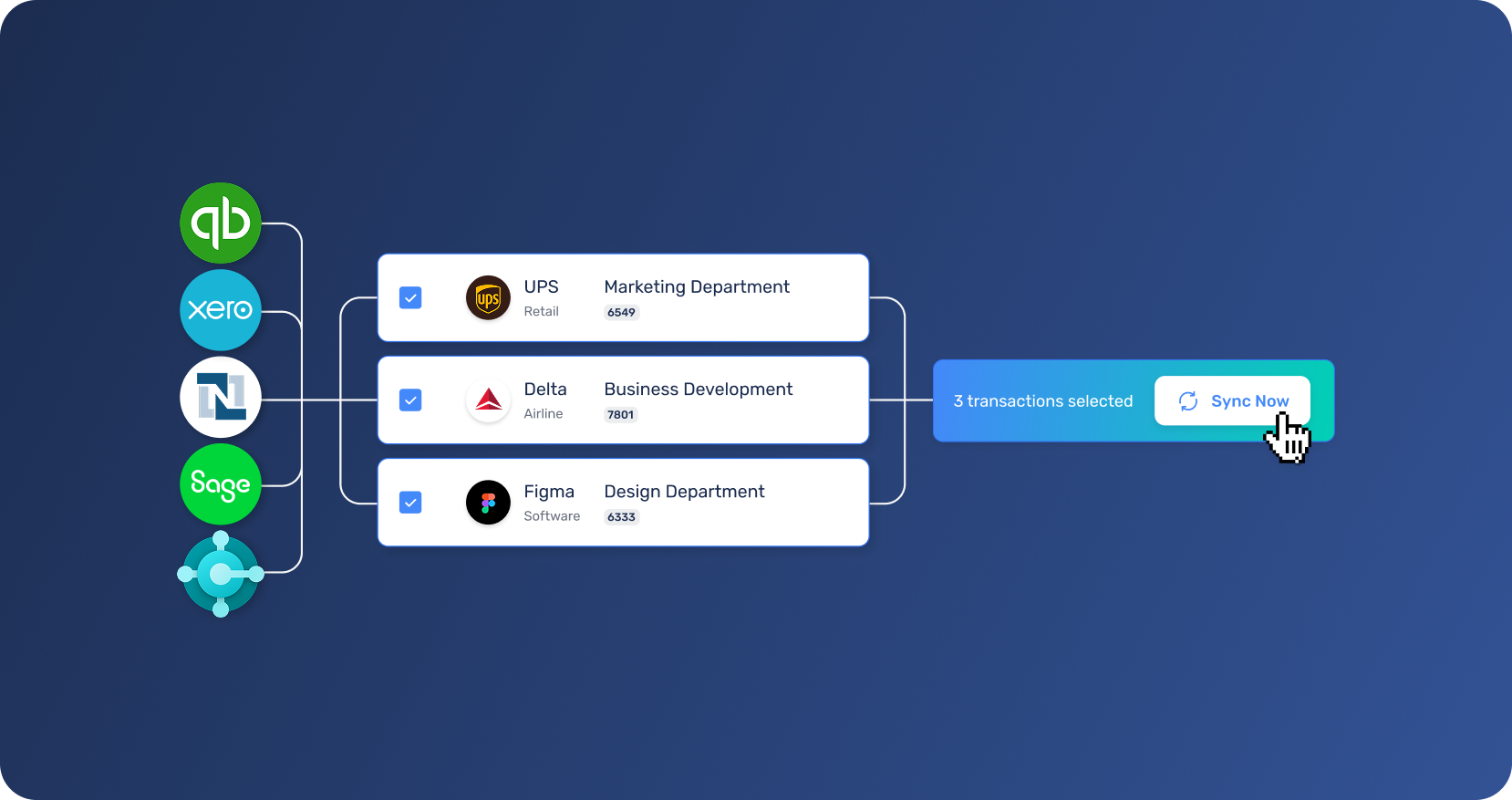
Finance teams rely on their accounting system to maintain accurate records and complete reconciliation efficiently. When expense data lives in separate systems, teams often spend time exporting files, re-entering transactions, or cleaning up data during month-end close.
Extend supports integrations with Xero, Sage Intacct, and Microsoft Dynamics 365 Business Central, expanding the accounting systems organizations can connect directly to the platform.
These integrations join Extend’s existing support for QuickBooks Online, QuickBooks Desktop, and NetSuite, giving finance teams more flexibility to connect Extend to the systems they already use.
Once connected, Extend syncs accounting codes into the platform so teams can categorize transactions before sending them to the ledger. Finance teams review cleared transactions and push them to their accounting platform when they’re ready.
By connecting spend workflows more closely with your accounting platform, Extend helps teams maintain cleaner financial data and run reconciliation with greater confidence.
If your team is ready to simplify how expense data moves into your accounting system, get in touch with us and we'll walk you through how it works.
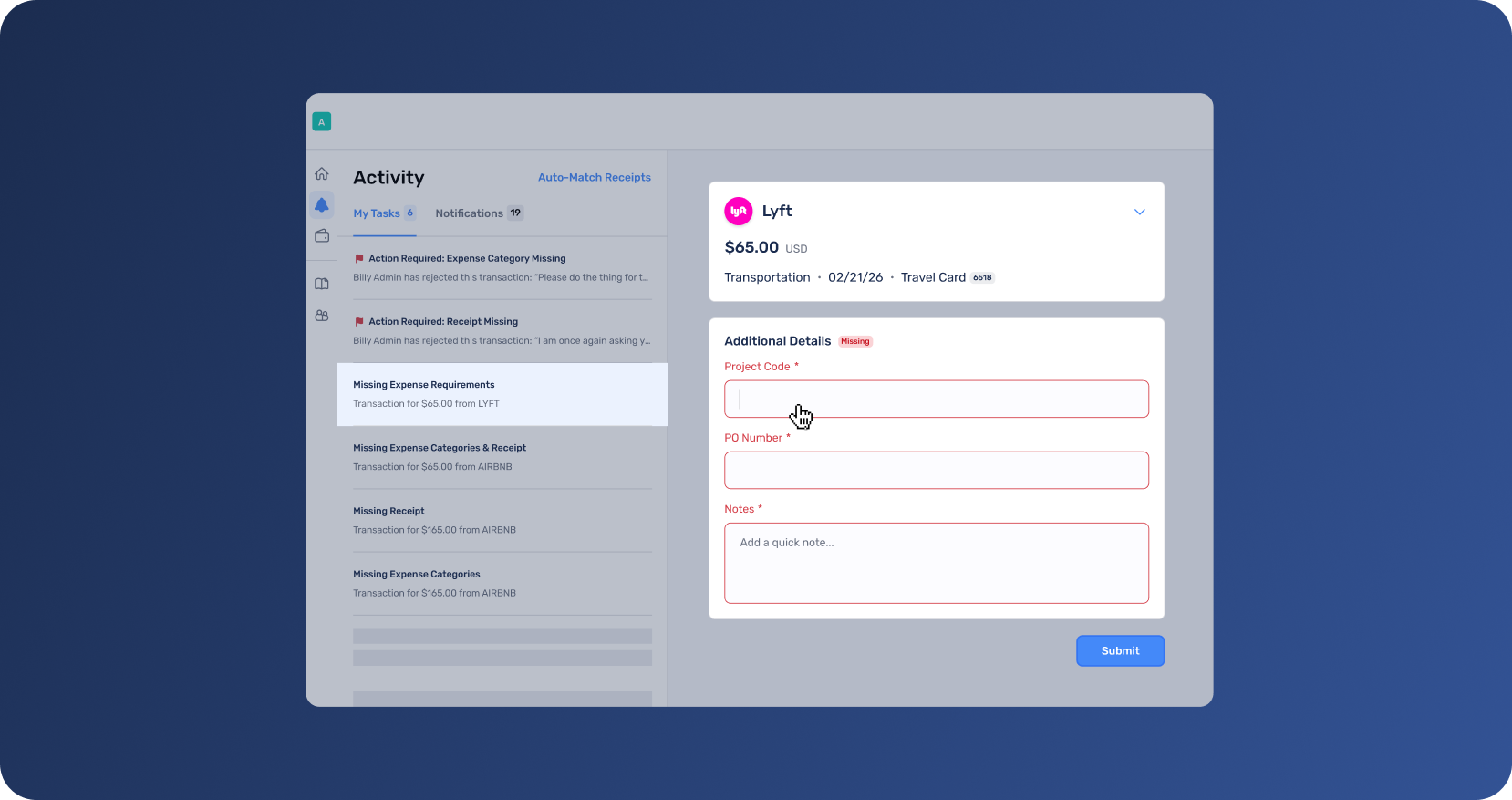
Some expenses require more context than an amount and category. Teams often need additional details—such as business purpose, attendees, a memo, or internal references—to properly review transactions and understand the reason behind a purchase.
With additional fields for expense capture, organizations can define the additional information employees need to include for a given expense.
These fields appear directly on the transaction, allowing employees to add the important details while reviewing their spend. Approvers and finance teams can then see this context directly within the transaction when evaluating expenses.
Capturing this information earlier reduces follow-ups for missing details and gives finance teams the information they need to review expenses more quickly and confidently.
These updates are designed to improve the everyday workflows finance teams rely on—organizing transactions, reviewing expenses, and preparing data for reconciliation.
To get started:
Log in to your Extend account to explore these new capabilities, or learn more about how Extend supports modern expense management workflows.
Accounting integrations and other advanced capabilities may be available to select bank customers and organizations on Pro and Enterprise plans. Feature availability may vary depending on your bank and plan. Starter plan customers can upgrade in-app or contact their Admin or Account Manager to learn more.
Dawn Lewis
Controller at Couranto
Bridget Cobb
Staff Accountant at Healthstream
Brittany Nolan
Sr. Product Marketing Manager at Extend (moderator)

Teams using Extend can now move faster from transaction to reconciliation with new updates that simplify expense workflows and deepen accounting connections.
With these updates, you can:
As organizations grow, expense workflows become more complex. Transactions happen across multiple cards, projects, and departments, while finance teams still need clear visibility into spending and reliable data for reconciliation.
Extend strengthens the connection between card spend and accounting workflows—helping teams capture the right expense information earlier, and prepare transactions for reconciliation before they reach the general ledger.
Recent updates expand accounting integrations and improve how teams organize and review transactions inside Extend, helping finance teams move faster through everyday expense management workflows.
Here’s what’s new.
Finance teams repeatedly return to the same transaction workflows every day—review transactions missing receipts, prepare expenses for reconciliation, or analyze spend by vendor, department, or cardholder.
Saved Views allow users to save the transaction page with their specific workflow filters and columns so teams can return to them instantly.
Finance teams rely on their accounting system to maintain accurate records and complete reconciliation efficiently. When expense data lives in separate systems, teams often spend time exporting files, re-entering transactions, or cleaning up data during month-end close.
Extend supports integrations with Xero, Sage Intacct, and Microsoft Dynamics 365 Business Central, expanding the accounting systems organizations can connect directly to the platform.
These integrations join Extend’s existing support for QuickBooks Online, QuickBooks Desktop, and NetSuite, giving finance teams more flexibility to connect Extend to the systems they already use.
Once connected, Extend syncs accounting codes into the platform so teams can categorize transactions before sending them to the ledger. Finance teams review cleared transactions and push them to their accounting platform when they’re ready.
By connecting spend workflows more closely with your accounting platform, Extend helps teams maintain cleaner financial data and run reconciliation with greater confidence.
If your team is ready to simplify how expense data moves into your accounting system, get in touch with us and we'll walk you through how it works.
Some expenses require more context than an amount and category. Teams often need additional details—such as business purpose, attendees, a memo, or internal references—to properly review transactions and understand the reason behind a purchase.
With additional fields for expense capture, organizations can define the additional information employees need to include for a given expense.
These fields appear directly on the transaction, allowing employees to add the important details while reviewing their spend. Approvers and finance teams can then see this context directly within the transaction when evaluating expenses.
Capturing this information earlier reduces follow-ups for missing details and gives finance teams the information they need to review expenses more quickly and confidently.
These updates are designed to improve the everyday workflows finance teams rely on—organizing transactions, reviewing expenses, and preparing data for reconciliation.
To get started:
Log in to your Extend account to explore these new capabilities, or learn more about how Extend supports modern expense management workflows.
Accounting integrations and other advanced capabilities may be available to select bank customers and organizations on Pro and Enterprise plans. Feature availability may vary depending on your bank and plan. Starter plan customers can upgrade in-app or contact their Admin or Account Manager to learn more.
Teams using Extend can now move faster from transaction to reconciliation with new updates that simplify expense workflows and deepen accounting connections.
With these updates, you can:
As organizations grow, expense workflows become more complex. Transactions happen across multiple cards, projects, and departments, while finance teams still need clear visibility into spending and reliable data for reconciliation.
Extend strengthens the connection between card spend and accounting workflows—helping teams capture the right expense information earlier, and prepare transactions for reconciliation before they reach the general ledger.
Recent updates expand accounting integrations and improve how teams organize and review transactions inside Extend, helping finance teams move faster through everyday expense management workflows.
Here’s what’s new.
Finance teams repeatedly return to the same transaction workflows every day—review transactions missing receipts, prepare expenses for reconciliation, or analyze spend by vendor, department, or cardholder.
Saved Views allow users to save the transaction page with their specific workflow filters and columns so teams can return to them instantly.
Finance teams rely on their accounting system to maintain accurate records and complete reconciliation efficiently. When expense data lives in separate systems, teams often spend time exporting files, re-entering transactions, or cleaning up data during month-end close.
Extend supports integrations with Xero, Sage Intacct, and Microsoft Dynamics 365 Business Central, expanding the accounting systems organizations can connect directly to the platform.
These integrations join Extend’s existing support for QuickBooks Online, QuickBooks Desktop, and NetSuite, giving finance teams more flexibility to connect Extend to the systems they already use.
Once connected, Extend syncs accounting codes into the platform so teams can categorize transactions before sending them to the ledger. Finance teams review cleared transactions and push them to their accounting platform when they’re ready.
By connecting spend workflows more closely with your accounting platform, Extend helps teams maintain cleaner financial data and run reconciliation with greater confidence.
If your team is ready to simplify how expense data moves into your accounting system, get in touch with us and we'll walk you through how it works.
Some expenses require more context than an amount and category. Teams often need additional details—such as business purpose, attendees, a memo, or internal references—to properly review transactions and understand the reason behind a purchase.
With additional fields for expense capture, organizations can define the additional information employees need to include for a given expense.
These fields appear directly on the transaction, allowing employees to add the important details while reviewing their spend. Approvers and finance teams can then see this context directly within the transaction when evaluating expenses.
Capturing this information earlier reduces follow-ups for missing details and gives finance teams the information they need to review expenses more quickly and confidently.
These updates are designed to improve the everyday workflows finance teams rely on—organizing transactions, reviewing expenses, and preparing data for reconciliation.
To get started:
Log in to your Extend account to explore these new capabilities, or learn more about how Extend supports modern expense management workflows.
Accounting integrations and other advanced capabilities may be available to select bank customers and organizations on Pro and Enterprise plans. Feature availability may vary depending on your bank and plan. Starter plan customers can upgrade in-app or contact their Admin or Account Manager to learn more.
Teams using Extend can now move faster from transaction to reconciliation with new updates that simplify expense workflows and deepen accounting connections.
With these updates, you can:
As organizations grow, expense workflows become more complex. Transactions happen across multiple cards, projects, and departments, while finance teams still need clear visibility into spending and reliable data for reconciliation.
Extend strengthens the connection between card spend and accounting workflows—helping teams capture the right expense information earlier, and prepare transactions for reconciliation before they reach the general ledger.
Recent updates expand accounting integrations and improve how teams organize and review transactions inside Extend, helping finance teams move faster through everyday expense management workflows.
Here’s what’s new.
Finance teams repeatedly return to the same transaction workflows every day—review transactions missing receipts, prepare expenses for reconciliation, or analyze spend by vendor, department, or cardholder.
Saved Views allow users to save the transaction page with their specific workflow filters and columns so teams can return to them instantly.
Finance teams rely on their accounting system to maintain accurate records and complete reconciliation efficiently. When expense data lives in separate systems, teams often spend time exporting files, re-entering transactions, or cleaning up data during month-end close.
Extend supports integrations with Xero, Sage Intacct, and Microsoft Dynamics 365 Business Central, expanding the accounting systems organizations can connect directly to the platform.
These integrations join Extend’s existing support for QuickBooks Online, QuickBooks Desktop, and NetSuite, giving finance teams more flexibility to connect Extend to the systems they already use.
Once connected, Extend syncs accounting codes into the platform so teams can categorize transactions before sending them to the ledger. Finance teams review cleared transactions and push them to their accounting platform when they’re ready.
By connecting spend workflows more closely with your accounting platform, Extend helps teams maintain cleaner financial data and run reconciliation with greater confidence.
If your team is ready to simplify how expense data moves into your accounting system, get in touch with us and we'll walk you through how it works.
Some expenses require more context than an amount and category. Teams often need additional details—such as business purpose, attendees, a memo, or internal references—to properly review transactions and understand the reason behind a purchase.
With additional fields for expense capture, organizations can define the additional information employees need to include for a given expense.
These fields appear directly on the transaction, allowing employees to add the important details while reviewing their spend. Approvers and finance teams can then see this context directly within the transaction when evaluating expenses.
Capturing this information earlier reduces follow-ups for missing details and gives finance teams the information they need to review expenses more quickly and confidently.
These updates are designed to improve the everyday workflows finance teams rely on—organizing transactions, reviewing expenses, and preparing data for reconciliation.
To get started:
Log in to your Extend account to explore these new capabilities, or learn more about how Extend supports modern expense management workflows.
Accounting integrations and other advanced capabilities may be available to select bank customers and organizations on Pro and Enterprise plans. Feature availability may vary depending on your bank and plan. Starter plan customers can upgrade in-app or contact their Admin or Account Manager to learn more.
Learn more about Extend and find out if it's the right solution for your business.


%201.png)


%201.png)
